
You open one app to check a message and surface forty minutes later, tired and a little worse about your life. You don’t want to quit, because your friends, your news and maybe your work live there. This guide shows you a calm, practical system for managing social media so it supports your wellbeing: a quick audit, phone settings, time budgets, feed cleanup and a weekly reset you can start today.
Managing social media for your mental wellbeing means deciding in advance when, where and why you use each app, instead of letting the apps decide for you. Start with a short audit of how each platform leaves you feeling. Then add friction with phone settings, give yourself a daily time budget, unfollow accounts that drain you, and review your habits once a week. Small, steady limits work better than dramatic deletions.
- ✓Rate each app for one week on how you feel after using it, then keep the ones that leave you steadier.
- ✓Move social apps off your home screen and turn off every non-human notification today.
- ✓Pick a daily time budget per app, such as 10 to 30 minutes, and let a timer hold the line for you.
- ✓Unfollow or mute any account that reliably leaves you feeling behind, angry or not good enough.
- ✓Use a two-question check before posting: why am I sharing this, and how will I feel if nobody reacts?
- ✓Spend ten minutes every Sunday reviewing your screen time and adjusting one rule for the week ahead.
Why Managing Social Media Works Better Than Quitting for Most People
Managing social media is usually more realistic than deleting it, because the apps hold real parts of your life. Your cousin’s baby photos, your neighbourhood group, your side project and your best friend’s jokes all sit in the same place as the doomscroll. Cutting everything at once often ends with a guilty reinstall a week later.

A management approach accepts that social media has costs and benefits. The aim isn’t purity. It’s a setup where the useful parts stay and the draining parts shrink, without you needing heroic willpower every evening.
What the research actually suggests
Limits seem to help more than people expect. In one University of Pennsylvania experiment, 143 students limited Facebook, Instagram and Snapchat to 10 minutes per platform per day for three weeks. Compared with a group that kept their usual habits, they showed significant drops in loneliness and depression, and the effect was strongest for those who started out lower.
That’s a small group of students, so treat it as a hint, not a law. Still, the message is encouraging. You didn’t have to vanish from the internet to feel a difference. You only had to use less than usual, on purpose.
Mixed feelings are normal
People feel both pulls at once. In an American Psychiatric Association poll, 72% of adults said social media made them feel connected and happy, yet 63% said it does more harm than good. If you feel that same contradiction, nothing is wrong with you. It simply means managing social media needs rules, not a verdict.
Run a 10-Minute Audit Before You Change Anything
A short audit shows you which apps help and which ones hurt, so your limits land in the right place. Most people guess wrong when managing social media by instinct. The app they blame isn’t always the one that leaves them flat.
The after-feeling score
For seven days, rate every session the moment you close the app. Use a simple scale from minus two (drained, anxious, envious) to plus two (lighter, connected, informed). Write the score in your notes app along with the platform and the time of day.
You’re looking for patterns, not perfection. Maybe short-video apps feel fine at lunch but awful at 11 p.m. Maybe one group chat lifts you while the main feed sinks you. That’s the data that makes managing social media personal instead of generic.
| Audit question | What to write down | What it tells you |
|---|---|---|
| Which app did I open? | Platform name | Where your time actually goes |
| Why did I open it? | Boredom, habit, a message, a task | Whether use was chosen or automatic |
| When? | Time and place (bed, desk, queue) | Your risk hours and risk spots |
| How long? | Minutes from screen-time report | Gap between felt time and real time |
| How do I feel now? | Score from -2 to +2 | Which apps earn a place in your day |
Reading your results
If an app averages below zero, it gets the strictest limits. If it averages above zero, keep it but protect the context where it works. And if one time slot keeps scoring low, such as late evening, build a rule around that hour rather than the app itself.
Set Up Your Phone So Managing Social Media Takes Less Willpower
The fastest win in managing social media is changing your phone, not your character. Apps are built to be easy to open and hard to close. A few settings put a small speed bump between the urge and the scroll, and that pause is often enough.
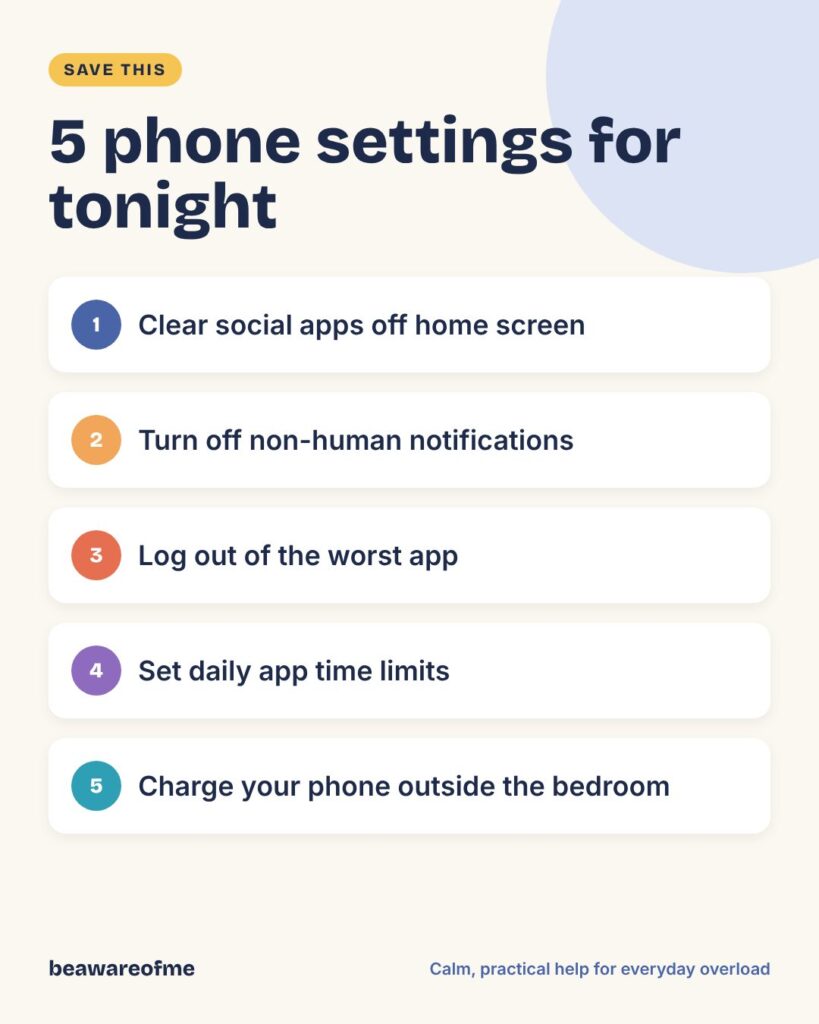
Five settings to change tonight
You don’t need all five at once. When managing social media on a busy week, start with the home screen and notifications, because they cost nothing and change the most. If late-night use is your weak spot, read our guide to setting a digital curfew for your phone.
Give Every App a Time Budget That Actually Holds
A time budget turns a vague intention into a number your phone can enforce. ‘Use it less’ fails because nobody knows what less means at 10 p.m. ‘Twenty minutes, then the app locks’ is a decision you made earlier, when you were calm.
Choosing your numbers
Look at your current daily average and cut it by roughly a third for the first two weeks. If you average 90 minutes, aim for 60. After that, adjust down again if your audit scores keep improving. The Penn group used 10 minutes per app, which is a useful lower anchor.
Split your budget into windows instead of one lump. Two or three short sessions at chosen times feel calmer than constant checking. Many people like one window after lunch and one in the early evening, with nothing in the first hour after waking.
What a calmer 30-minute day can look like
Here’s one realistic example, not a prescription. You leave your phone on the kitchen counter overnight and skip apps until after breakfast. At lunch you give yourself a 15-minute window for messages and one feed. In the early evening you take another 15 minutes, then the apps lock at 9 p.m.
That adds up to 30 minutes of chosen use instead of two hours of drifting. Managing social media this way still lets you reply to friends, see the news you care about and enjoy a few funny videos. What disappears is mostly the grey, half-attentive scrolling you never really chose.
Your version will look different. A night-shift worker, a parent of toddlers and a freelancer who markets on social apps all need different windows. The principle of managing social media stays the same: decide the windows when you’re calm, then let the phone hold them.
If-then rules for the tricky moments
- If you reach for your phone in a queue, then look around and name three things you can see first.
- If you catch yourself scrolling in bed, then put the phone across the room and read one page of a book.
- If your limit pops up, then close the app before deciding whether to extend it.
- If news makes you anxious, then get headlines once a day from one trusted source instead of the feed.
- If you open an app without a reason, then close it and do one small physical thing, like refilling water.
These rules work because they replace the habit instead of just blocking it. Your hand still has somewhere to go. If endless scrolling is the main problem, our guide on how to stop doomscrolling has more swaps.
Curate a Feed That Leaves You Calmer, Not Smaller
Your feed is a diet, and managing social media includes choosing what goes on the plate. The algorithm feeds you what keeps you watching, which isn’t the same as what’s good for you. You can retrain it with a few deliberate taps each week.
The mute, unfollow, follow routine
Spend ten minutes going through who you follow. This is the most underrated part of managing social media. For each account, ask one question: do I usually feel better or worse after seeing this? If worse, mute or unfollow. Muting is perfect for friends and family you don’t want to offend.
Then add three accounts that genuinely help you. The APA suggests following hashtags and communities around things that ground you, like hobbies, nature, creative work or practical skills. A feed with more of what you love leaves less room for what drains you.
Comparison triggers to watch for
Some content is quietly harder on mood than it looks: perfect homes, perfect bodies, perfect careers, and endless ‘day in my life’ routines. You aren’t weak for feeling small after them. You’re comparing your unedited Tuesday to someone’s best ten seconds. Our guide on realistic ways to stop comparing yourself on social media walks through this.
You don’t owe any account your attention. Unfollowing is a boundary, not a judgment.
Also notice how you engage, not just what you see. Watching silently tends to feel emptier than commenting on a friend’s post or sending them a message. If you want a deeper look at this, read whether social media is making you more isolated or more connected.
Post Without the Aftershock: Simple Rules for Sharing
What you post affects your wellbeing as much as what you read. Many people feel fine scrolling but anxious after sharing, checking likes every few minutes and replaying comments. A couple of posting rules belong in any plan for managing social media, and they take most of that sting away.
The two-question pause
Before you post, ask: why am I sharing this? And how will I feel if almost nobody reacts? If the honest answer to the second question is ‘pretty bad’, save it as a draft and look again tomorrow. Often the urge fades, and that’s useful information.
Set a check-back window
Decide in advance when you’ll look at reactions, such as once that evening and once the next day. In between, the app stays closed. Constant checking trains your brain to treat each like as a tiny verdict on your worth.
| Instead of this | Try this |
|---|---|
| Checking likes every few minutes | One check in the evening, one the next day |
| Posting when upset or lonely | Texting one person directly instead |
| Arguing in comment threads | Muting the thread and walking away |
| Sharing private details for comfort | Saving those for people who know you offline |
| Deleting posts that ‘flopped’ | Leaving them and noticing the feeling pass |
A good test: would you share this with a small group of real friends at dinner? If yes, it probably belongs online too. If no, it may belong in a journal or a private message instead.
The Sunday Reset: A Weekly Review for Managing Social Media
A weekly review keeps managing social media from fading into last month’s good intention. Habits drift. New apps arrive, old limits get extended, and one stressful week can undo a lot. Ten minutes on a Sunday catches the drift early.
- Open your screen-time report and note your weekly total and top three apps.
- Compare it with last week. Up, down or flat? No judgment, just numbers.
- Look at your after-feeling scores. Which app scored lowest this week?
- Change one rule only: tighten a limit, mute an account or move an app.
- Plan one offline thing for the week, like a walk, call or hobby session.
- Write one sentence about how your mind felt this week compared with the last.
Why one change at a time works
Changing everything at once feels productive but tends to collapse by Wednesday. One small adjustment per week builds a setup that lasts, because each step is easy enough to keep. After a couple of months, you’ll have a system that fits you exactly.
Over time, the review gets quicker. Many people find they only need a few minutes once the setup settles. For more ideas on rhythm and routines, see our guide to healthy social media habits for your mental health, and if you want calmer in-the-moment use, try these mindful social media techniques.
When a full break makes sense
Sometimes managing social media isn’t enough for a while. If your scores stay low, sleep suffers, or you feel tense every time you open an app, a planned break of a few days or weeks can reset things. Our guide to a digital detox that actually works shows you how to plan one without the rebound.
5 Common Mistakes People Make When Managing Social Media
Most setbacks in managing social media come from a few predictable traps. Knowing them in advance saves you a lot of frustration, and keeps managing social media from turning into another thing you feel guilty about.
1. Relying on willpower alone
Deciding to ‘just use it less’ puts all the work on your tired evening brain. That’s exactly when apps are hardest to resist. Instead, change settings during the day so the evening version of you has less to fight.
2. Deleting everything, then bouncing back
A dramatic purge feels great for two days. Then you miss a birthday invite or a work message, reinstall everything and give up on limits altogether. Cut the worst app first and keep the useful ones with clear rules.
3. Blaming the wrong app
People often target the app they use most, not the one that hurts most. Your audit may show that a short daily check of one platform drains you more than an hour on another. Let your after-feeling scores guide your limits, not your guilt.
4. Ignoring the context
The same app can be harmless at lunch and harmful at midnight. If you only set total-time limits, you miss the pattern. Add rules about place and time, such as no apps in bed or before breakfast.
5. Leaving a gap where the habit used to be
When you take away a habit without replacing it, the urge just waits. Have a ready swap for each risky moment: a book by the bed, a podcast for the commute, a friend to text. The replacement matters as much as the limit.
Frequently Asked Questions About Social Media and Your Wellbeing
How much social media use per day is healthy for adults?
There’s no single safe number for everyone, so watch how you feel rather than chasing a target. A useful starting point is cutting your current daily average by about a third. In one Penn experiment, students who limited three apps to 10 minutes each per day reported less loneliness and depression after three weeks. Your own after-feeling scores are the best guide.
Is it better to delete social media or limit it?
For most people, limiting works better than deleting, because the apps also hold friendships, family updates and useful groups. Deleting can backfire when you miss something important and reinstall everything. Start by limiting your lowest-scoring app, turning off notifications and moving apps off your home screen. Consider a planned break only if limits don’t ease the strain after a few weeks.
How do I stop checking social media first thing in the morning?
Charge your phone outside the bedroom and use a simple alarm clock instead. Then give yourself a phone-free first hour with a small ritual, like water, light and a few stretches. If that feels too hard, start with 15 minutes and stretch it each week. The aim is to let your own thoughts arrive before everyone else’s do.
Why do I feel worse after scrolling even when nothing bad happened?
Scrolling exposes you to dozens of polished highlights in a few minutes, and your brain compares them with your ordinary day. Passive watching also tends to feel emptier than actually talking to someone. Fast-switching content can leave you mentally tired too. Noticing the feeling is the first step, and swapping some scrolling for direct messages often helps.
What are the best phone settings for social media wellbeing?
The most useful settings are free and quick. Move social apps off your home screen, turn off every notification that isn’t a message from a real person, and set daily app limits in your screen-time tools. Logging out of your most draining app adds helpful friction. Charging your phone outside the bedroom protects both your sleep and your mornings.
How long does it take to feel better after cutting back?
Many people notice small changes, like calmer evenings or better sleep, within a week or two. The Penn study measured meaningful improvements after three weeks of reduced use. Your experience may differ depending on how much you used before and what else is going on in your life. A weekly review helps you see progress you might otherwise miss.
You don’t need to win a battle with your phone every night. Managing social media well means setting it up once, checking in weekly and letting small limits do the heavy lifting. Start with one setting today, and let your calmer evenings show you it’s working.