
You’ve probably promised yourself a hundred times that you’d scroll less, and then found yourself on your phone at midnight anyway. That isn’t a willpower problem. It’s a habit problem, and habits can be redesigned. This guide shows you how to build healthy social media habits that fit real life: a quick audit, nine simple daily routines, phone settings that do the work for you, and a seven-day plan you can start today.
Healthy social media habits are small, repeatable routines that decide when, why and how long you use social apps, so your mood stays steady instead of being pulled around by your feed. The core moves are simple: keep your phone out of the first and last half hour of the day, open apps with a purpose, mute accounts that leave you worse, add friction to endless feeds, and check in with how you feel after each session.
- ✓Build healthy social media habits around cues, like waking up or sitting on the sofa, instead of relying on willpower.
- ✓Spend three days noting how each app makes you feel before you cut anything.
- ✓Keep your phone out of the first 30 minutes after waking and the last hour before sleep.
- ✓Add friction: log out, move apps off the home screen and turn off non-human notifications.
- ✓Expect a new routine to take weeks to feel automatic, and don’t quit after one slip.
- ✓Judge progress by how you feel, not just by your screen time number.
Why Healthy Social Media Habits Beat Willpower Every Time
Healthy social media habits work because they remove the daily decision. Willpower runs out by evening. A routine just runs.
A habit is a behaviour your brain triggers automatically in response to a cue, like reaching for your phone the second you sit down. Social apps are built to make that reach effortless. So the smartest move isn’t to fight every urge. It’s to change the cues, the routine and the reward.
Habits run on cues, not decisions
Most scrolling starts with a trigger you barely notice: boredom in a queue, a lull at work, the moment you get into bed. If you can spot your top three triggers, you can attach a different routine to each one. That’s the whole game.
For example, if your trigger is waiting for the kettle, the old routine is opening a feed. A new routine might be stretching your shoulders or texting one friend. Same cue, different action, and over time the new action starts to feel like the default.
Friction is your best friend
Every extra tap between you and a feed lowers the odds you’ll open it on autopilot. Logging out, burying an app in a folder or turning on greyscale all add a small pause. That pause is often enough for your thinking brain to catch up and ask, “Do I actually want this right now?”
New routines take longer than 21 days
The popular idea that habits form in 21 days doesn’t hold up well. Research from University College London found it took an average of 66 days for a new daily behaviour to feel automatic. Missing one day didn’t undo progress, but very inconsistent practice did. So go easy on yourself, and keep showing up.
Run a 3-Day Audit Before You Change a Single Thing
Before building healthy social media habits, find out what your current ones are actually doing to you. Three days of honest notes beat a month of vague guilt.
How to run the audit
- Open your phone’s screen time or digital wellbeing settings and note your top five apps by time.
- After each app session, rate how you feel from minus 2 (worse) to plus 2 (better).
- Jot down the trigger that made you open the app: bored, lonely, avoiding work, genuinely curious.
- Note the time of day. Patterns usually jump out by day three.
- Don’t change anything yet. You’re gathering facts, not judging yourself.
At the end, sort each app into one of three groups. This quick table shows how.
| Result after 3 days | What it means | What to do |
|---|---|---|
| Mostly +1 or +2 | This app genuinely helps you | Keep it, with a gentle time cap |
| Mixed scores | It depends on how you use it | Trim: mute accounts, limit to set times |
| Mostly -1 or -2 | It drains you more than it gives | Cut it, log out or move it off your phone |
| High time, low memory | You use it on autopilot | Add friction and a clear purpose |
You don’t need a perfect screen time number. You need a day that feels like yours.
9 Healthy Social Media Habits for Every Part of Your Day
The easiest healthy social media habits attach to moments you already have: waking up, working and winding down. Here are three for each part of the day. Start with the two that feel easiest.
Morning: protect the first half hour
Daytime: stop the drip at work
Evening: land the day gently
Set Up Your Phone So the Healthy Choice Is the Easy One
Your phone settings can carry most of the effort of healthy social media habits for you. Ten minutes of setup now saves hundreds of small battles later.
Settings that add helpful friction
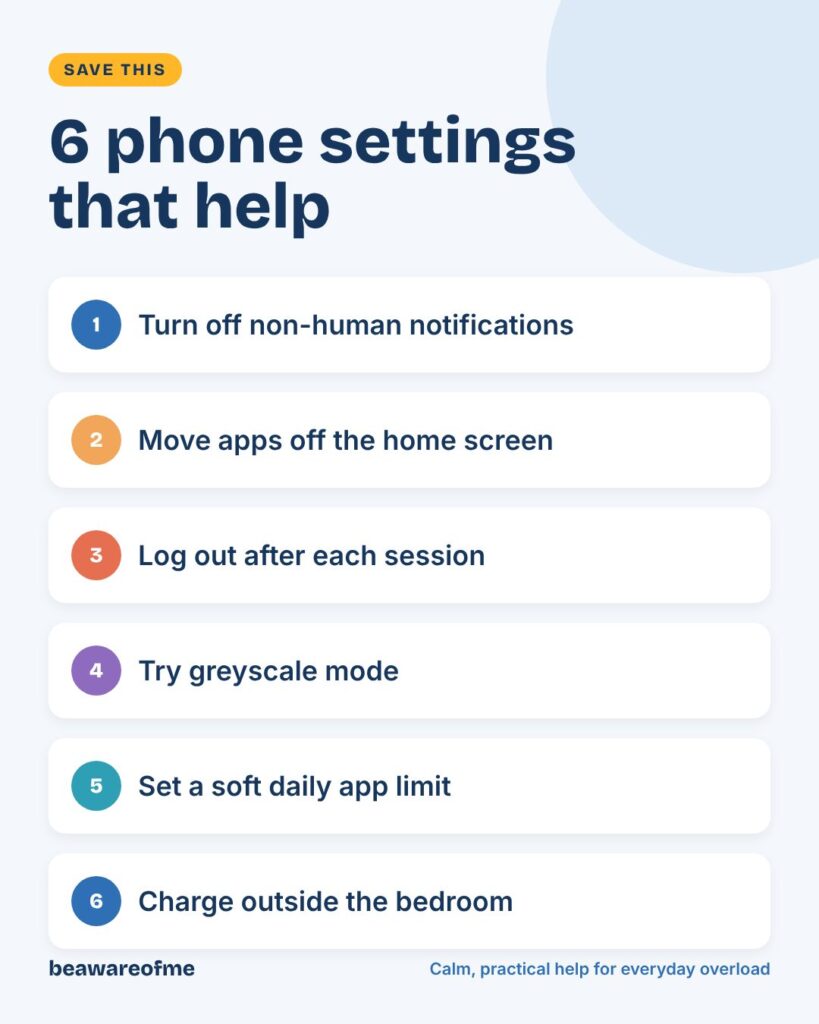
- Turn off non-human notifications. Keep messages from real people; switch off likes, suggestions and “you might have missed” alerts.
- Move social apps off the home screen. Put them in a folder on the last page so opening them takes a deliberate swipe.
- Log out after each session. Typing a password is a small speed bump that breaks autopilot.
- Try greyscale. Removing colour makes feeds less eye-catching, and many people find it easier to put the phone down.
- Use built-in app limits. Set a soft daily cap on your most draining app and let your phone remind you.
- Use the browser instead of the app. Feeds tend to feel clunkier in a browser, which naturally shortens visits.
If built-in settings aren’t enough, a focus app can help. We compared a few in our roundup of apps to cut screen time and boost focus. You can also mark certain rooms as phone-free, which our guide to creating screen-free zones covers step by step.
Clean up your feed in one sitting
Settings handle how often you open apps. Your feed decides how you feel once you’re inside. Spend fifteen minutes muting or unfollowing accounts that trigger comparison, outrage or envy. Then follow a few that teach you something, make you laugh or connect you to real interests.
A 7-Day Starter Plan for Healthy Social Media Habits
This plan introduces one change a day, so nothing feels overwhelming. By day seven you’ll have a full set of healthy social media habits running in the background.
| Day | One small change | Why it helps |
|---|---|---|
| 1 | Turn off non-human notifications | Fewer pings means fewer automatic checks |
| 2 | Move social apps off the home screen | Adds a pause before every open |
| 3 | Mute five draining accounts | Your feed starts working for you |
| 4 | No phone for the first 30 minutes after waking | Your day starts calmer |
| 5 | Charge your phone outside the bedroom | Protects sleep and night-time mood |
| 6 | Batch checks into two or three set times | Protects focus during the day |
| 7 | Do a 60-second look-back and adjust | Keeps the plan honest and personal |
How to keep going after week one
Keep the changes that felt good and repeat them for the next few weeks, because healthy social media habits grow stronger with repetition. Remember the UCL finding: automatic habits often take around two months. If a change felt miserable, swap it for a gentler version rather than dropping it completely.
- Phone stayed out of the first 30 minutes of my day
- I named a purpose before opening a social app
- I checked apps in batches, not all day
- Phone charged outside the bedroom tonight
- I did a 60-second look-back before sleep
Habit Tweaks for Parents, Remote Workers and Night Owls
The best healthy social media habits fit the life you actually have. A parent of toddlers, a remote worker and a shift worker face very different triggers, so here are tweaks for each.
If you’re a busy parent
Parents often scroll in the cracks: during naps, at the playground, after bedtime. Those cracks are also the only rest you get, so they matter. Try one phone-free stretch with your kids each day, even 20 minutes at dinner, and save your scrolling for a single window once they’re asleep.
Kids copy what they see. When you put your phone in a basket during meals, you’re building healthy social media habits for the whole household, not just yourself. It’s a quiet lesson that sticks better than any lecture.
If you work from home
Remote work removes the natural breaks of commuting and office chat, and feeds rush in to fill the gap. Keep social apps off your work computer entirely. Use a separate browser profile for any work accounts, and take real breaks away from the desk.
A short walk at lunch does more for your focus than twenty minutes of scrolling. It also gives you a bit of the daylight and movement that home workers often miss.
If you’re a night owl or shift worker
Late hours make late scrolling feel normal. Instead of a clock-based phone bedtime, anchor your routine to your own sleep: apps close an hour before whenever you plan to sleep. Keep blackout blinds and a paper book nearby, so the wind-down doesn’t depend on a screen.
Whatever your situation, the principle stays the same. Find your biggest trigger, give it a new routine and make the old one slightly harder. That’s how healthy social media habits stick when life gets messy.
If This Happens, Do That: Rescue Rules for Slip Days
Every new routine has slip days, and healthy social media habits are no exception. The plan for bad days matters more than the plan for good ones. Use these if-then rules to get back on track fast.
Rules for the moments habits usually break
- If you scroll for an hour without noticing, then don’t punish yourself; just set your next session to start with a purpose.
- If you feel anxious without your phone, then keep it nearby but face-down, and shorten the gap gradually.
- If work needs social media, then keep a separate work account or browser profile so personal feeds don’t leak in.
- If stress pulls you back to doomscrolling, then pick one calming replacement, like a short walk or slow breathing, and do it first.
- If you feel left out after cutting back, then message friends directly instead of watching their stories.
- If you relapse for a whole weekend, then restart the seven-day plan from day one. That’s still progress.
Sometimes the pull feels stronger than a habit. If you recognise yourself in our list of signs you’re addicted to social media, the long-term strategies for social media addiction guide goes deeper.
How to Tell Your New Habits Are Really Working
The best sign your healthy social media habits are working is how your days feel, not a number on a screen. Screen time can help, but mood and sleep tell the fuller story.
Good signs to look for
- You fall asleep a little easier and wake up less foggy.
- You compare yourself to others less often, and it stings less when you do.
- You remember more of what you did online, because you chose it.
- You have more conversations with real people, online or off.
- Boredom feels tolerable again, sometimes even restful.
When to ask for more support
If social media still leaves you feeling low, anxious or isolated for weeks, despite your changes, it’s worth talking to a doctor or counsellor. Habits help, but they can’t fix everything. Feeling lonely online is common, and our guide to easing social media loneliness offers practical next steps.
For more calm, everyday reads like this one, browse our mental health in everyday life section.
5 Common Mistakes That Quietly Break Healthy Social Media Habits
These mistakes feel like progress at first, which is why they derail so many healthy social media habits. Here’s what goes wrong and what to try instead.
1. Starting with a total ban
Cold-turkey bans feel powerful for a day or two, then the rebound hits. Big swings make social media feel forbidden, and forbidden things pull harder. Start with one or two changes and build up. If you’d like a structured break, our social media detox guide shows how to take one safely.
2. Tracking minutes but ignoring mood
Cutting your screen time in half means little if the half you keep still leaves you anxious. Thirty minutes on a feed full of comparison can do more harm than an hour in a hobby group. Track how you feel after each session, not just the clock.
3. Relying on willpower at night
Your self-control is lowest when you’re tired. Promising yourself you’ll stop scrolling in bed rarely works. Change the environment instead: charge your phone in another room and keep something else to reach for.
4. Leaving every notification on
Each ping is a cue, and cues start habits. If likes, suggestions and reminders keep buzzing, you’re fighting the app’s design all day. Switch off everything that isn’t from a real person, and your new habits get much easier.
5. Quitting after one bad day
One evening of mindless scrolling doesn’t erase a week of progress. The UCL research found that missing a single day didn’t derail habit formation. Treat slips as data, ask what triggered them, and restart the next morning.
6 Questions About Building Better Scrolling Habits
What are healthy social media habits?
Healthy social media habits are routines that keep your social app use intentional and your mood steady. Examples include no phone for the first half hour after waking, checking apps at set times, muting accounts that make you feel worse, turning off non-human notifications and keeping your phone out of the bedroom. They focus on how you use apps, not just how long.
How much time on social media is healthy for adults?
There’s no official daily limit for adults. In one University of Pennsylvania experiment, young adults who used about 30 minutes a day felt less lonely and less low after three weeks. A practical guide is your own reaction: if you feel worse after most sessions, shorten them, change what you look at or move that app off your phone.
How long does it take to build a new social media habit?
Longer than most people expect. A University College London study found it took an average of 66 days for a daily behaviour to feel automatic, with wide variation between people. Missing one day didn’t undo progress, but very inconsistent practice did. Start small, repeat the same routine at the same cue and give it a couple of months.
Should I delete social media apps from my phone?
You don’t have to delete everything. Many people do well by removing only their most draining app, logging out of others, or using social sites in a browser instead. Deleting can help if an app consistently leaves you anxious or low. Keep the tools you use to talk to real people, like messaging apps or family groups, if they help.
How do I stop checking my phone first thing in the morning?
Move your phone out of reach before bed, ideally to another room, and use a simple alarm clock. Then give yourself one small morning anchor, such as water, daylight or a few slow breaths, before you look at any screen. Start with 15 minutes phone-free and gradually stretch it to 30 as the routine settles in.
What should I do if social media keeps making me feel bad?
First, notice which apps and accounts trigger the feeling, then mute, unfollow or limit them. Add more offline time with people you trust. If low mood, anxiety or loneliness continue for weeks, talk to a doctor or counsellor. If you have thoughts of harming yourself, contact emergency services or a crisis line such as 988 in the US.
Healthy social media habits aren’t about perfection or quitting; they’re about deciding in advance how your apps fit into your day. Start with one change tomorrow morning and build from there. Then pair these routines with our mindful social media techniques and our guide on how much screen time is too much to keep the calm going.