You pick up your phone to check the weather and surface twenty minutes later with three new worries, two half-read articles and no idea what the weather is. Your brain feels full but nothing feels finished. That foggy, buzzing state is digital overload, and you don’t need to throw your phone in a lake to fix it. This guide shows you how to spot it, measure your own input load and cut it down with small changes you can start tonight.
💙 Key takeaways
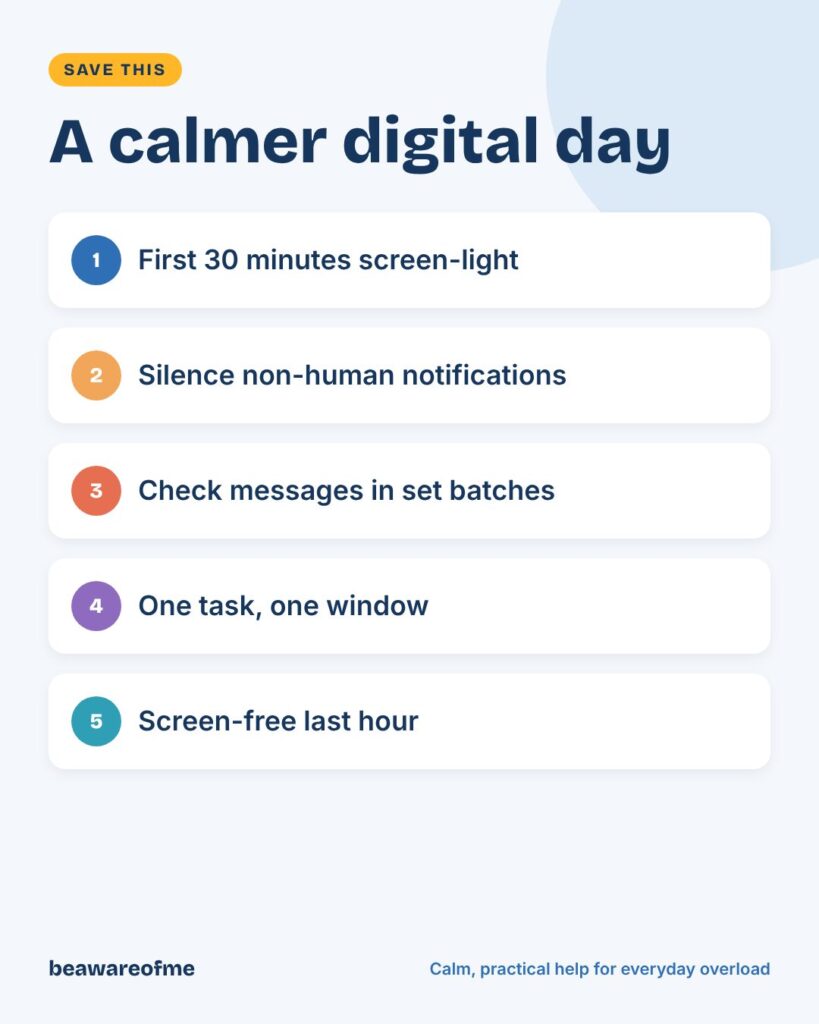
Turn off every notification that doesn’t come from a real person you know, which usually removes most interruptions in five minutes.
Check email and chat in two to four planned batches a day instead of all day long.
Keep the last hour before bed screen-free, since bright light and stimulating content can delay sleep.
Give your phone one main job in the evening, such as music or calls, and move everything else to another time.
Replace scroll breaks with real breaks: a short walk, a window, a drink of water.
Watch your body for overload signals like jaw tension, shallow breathing and that urge to check again.
What Digital Overload Actually Does to Your Mind
Digital overload is the mental strain of taking in more digital information than you can process. It isn’t a medical diagnosis. It’s a common pattern where constant input leaves too little time for your brain to rest, sort and recover.

Each ping asks for a small decision: open it now, later or never? Hundreds of those micro-decisions a day add up to real fatigue. Here’s the whole picture at a glance.
Digital overload at a glance
| Sign | What it feels like | First calm fix |
|---|---|---|
| Constant checking | Reaching for your phone without deciding to | Move social apps off your home screen |
| Scattered focus | Ten tabs open, none finished | One task, one window, 25 minutes |
| Wired evenings | Tired but can’t switch off | Screen-free last hour |
| Notification jumpiness | A buzz makes your stomach drop | Silence non-human alerts |
| Information fog | Lots read, little remembered | Pick two trusted sources, set times |
| Guilty rest | Breaks feel lazy without a screen | Offline micro-breaks |
Why your brain feels full
Your attention works like a small desk, not a warehouse. When new items keep landing before you’ve cleared the last ones, everything piles up and the desk feels chaotic. That’s why digital overload often shows up as irritability and forgetfulness rather than obvious stress.
Switching between tasks also has a cost. Each time you jump from a report to a message and back, it takes a moment to rebuild where you were. Do that dozens of times an hour, and a simple job starts to feel exhausting.
31%
of US adults say they go online almost constantly, according to one national survey.
Source: Pew Research Center
90 min
is how much bright room light can cut nighttime melatonin compared with dim light.
Source: Sleep Foundation
1 hour
of screen-free time before bed is a common recommendation for better sleep.
Source: Sleep Foundation
Digital overload versus an ordinary busy day
A busy day ends and you feel tired but settled. Digital overload ends and you still feel switched on, as if your brain kept a few tabs open after you shut the laptop. That leftover buzz is the clearest difference.
Another clue is how you rest. If your breaks also happen on a screen, your mind never gets a true pause. Digital overload builds quietly through those in-between moments, not just during working hours.
The Pew Research Center found that 31% of US adults say they’re online almost constantly. When being online is the default, rest has to be planned on purpose.
9 Quiet Signs of Digital Overload You Might Be Missing
Digital overload rarely announces itself. It looks like ordinary tiredness or a short temper, so many people don’t connect it to their screens. These signs are worth noticing, especially if several show up together.
Signs in your body
- Shallow breathing or holding your breath while reading emails.
- Tight jaw, neck or shoulders after long screen sessions.
- Tired eyes and headaches by mid-afternoon.
Signs in your mind
- Phantom buzzes: feeling your phone vibrate when it didn’t.
- Reading the same paragraph three times because your mind keeps drifting.
- Forgetting why you opened an app the moment it loads.
Signs in your mood and habits
- Restlessness when your phone isn’t nearby, even for a few minutes.
- Snapping at people who interrupt you while you’re scrolling.
- Lying awake replaying headlines or online conversations.
If you’re also struggling with low mood, anxiety or sleep for more than a couple of weeks, talk to a doctor. Reducing screen input can help, but it isn’t a replacement for proper support.
Audit Your Input: The 3-Day Digital Overload Check
You can’t reduce what you haven’t measured. A short, judgement-free audit shows you where digital overload actually comes from, which is often not where you’d guess. Three ordinary days are enough.
Step 1: Count your interruptions
Check your phone’s built-in screen-time report for pickups and notifications per day. Write down the top five apps by notifications. Most people find that a handful of apps cause most of the noise.
Step 2: Rate how you feel after each app
For each app you use often, give it a quick score after using it: better, same or worse. Be honest. An app that leaves you worse most of the time is costing more than it gives.
Step 3: Spot your trigger moments
Notice when you reach for your phone without deciding to. Common triggers include waiting in line, starting a hard task, feeling lonely and lying in bed. Those moments are where small changes make the biggest difference.
🧭 Try this today: your input scorecard
☐ Daily pickups: ____ Notifications: ____
☐ Top 3 noisiest apps: ____ / ____ / ____
☐ One app that leaves me feeling worse: ____
☐ My biggest trigger moment: ____
☐ One change I’ll test for 3 days: ____
Step 4: Decide keep, limit or leave
Now sort your apps into three groups. Keep the ones that leave you better and serve a clear purpose. Limit the ones that are useful but noisy, perhaps by moving them off your home screen or allowing them only at set times. Leave the ones that mostly make you feel worse.
You don’t have to delete anything forever. Try a two-week break and see whether you miss it. Many people find the app they feared losing barely crosses their mind after day three, and their digital overload drops noticeably without it.
Cut the Noise: Notification Triage in 10 Minutes
Notifications are the main highway for digital overload, so trimming them gives the fastest relief. The simplest rule is this: only real people you know should be allowed to interrupt you. Apps, shops and feeds can wait until you go to them.
Turn off non-human alerts
Shopping, news, games and social media likes all go silent.
Keep people, but sort them
Allow calls and messages from family and close contacts; mute large group chats.
Remove badges
Those red number circles create urgency. Switch them off for everything but messages.
Use a focus mode
Set work and sleep modes that let only your chosen people through.
Review in a week
If you missed nothing important, keep it. If you did, add back one alert at a time.
Make your home screen boring
Your home screen is prime real estate, and whatever lives there gets opened on autopilot. Move social media, news and shopping apps into a folder on the second page. Keep only tools on the first screen: maps, camera, calendar, notes.
Some people also switch their display to greyscale in the evening, which makes colourful feeds far less tempting. It sounds small, but every extra second between impulse and app gives you a chance to choose.
Batch instead of grazing
Checking email and chat constantly feels responsive but leaves every task half done. Choose two to four set times a day to process messages, such as 9:30, 12:30 and 16:00. Between those times, close the apps entirely.
If your job really requires fast replies, try a shorter cycle of every 45 minutes rather than every 45 seconds. You’ll still be responsive, just not reactive. Our guide to mindful technology at work has more workplace-friendly ideas, and our tips on calm microbreaks show what to do in the gaps.
Build a Calmer Day: Simple Rules for Morning, Work and Night
Structure beats willpower when it comes to digital overload. Instead of fighting your phone all day, give each part of the day a simple default. Then you only have to decide once.
Mornings: first 30 minutes screen-light
Checking news and messages before you’re fully awake lets other people’s priorities set your mood. Try a slow start: water, light, a few stretches, then your phone. Use a cheap alarm clock so your phone can charge outside the bedroom.
Work hours: one task, one window
Close tabs you aren’t using. Work in focused blocks of 25 to 50 minutes with chat closed, then take a short break away from the screen. If you’re tempted to check, write the urge on a sticky note and keep going.
Evenings: protect the last hour
The Sleep Foundation recommends avoiding screens in the hours before bed and spending the final hour on screen-free activities, noting that bright lighting can cut melatonin significantly. Stimulating content matters too. A heated thread at 23:00 keeps your mind racing long after the screen goes dark.
Set a phone bedtime and keep it simple. Our guide to digital curfews walks through how to set one, and creating screen-free zones helps you choose where devices don’t go.
You don’t need less technology. You need fewer things asking for you at once.
— beawareofme
At Work and at Home: Shared Spaces, Shared Rules
Digital overload isn’t only personal. Team chat norms and family device habits shape your load as much as your own choices. A few shared agreements can lighten things for everyone.
At work: agree on response times
Many teams never say how fast replies are expected, so everyone assumes “immediately.” Suggest a simple norm: chat within a few hours, email within a day, phone for real urgency. After-hours messages can wait unless they’re labelled urgent.
Workplace tension often travels through chat, too. If late-night messages are part of a wider pattern of politics at work, our guide on handling office politics calmly can help you set limits without damaging relationships.
Working from home: create a fake commute
When your office is your kitchen table, work messages can leak into every hour. A short ritual at the end of the day, such as a ten-minute walk, changing clothes or closing the laptop and putting it in a bag, tells your brain the workday is over. Without that line, digital overload from work simply blends into your evening.
At home: devices have a bedtime too
Children copy what adults do far more than what adults say. A family charging station outside bedrooms, no phones at meals and one screen-free evening a week give everyone a break. If screen limits spark arguments, our guide to screen time battles and our piece on balancing strict and supportive parenting show how to hold limits warmly.
Rest That Actually Recharges a Tired Brain
Swapping one screen for another isn’t rest. When you scroll on your break, your brain keeps processing input, so you return just as tired. Real recovery from digital overload means giving your senses something slower.
Offline micro-breaks that work
- Look out of a window at something far away for one minute.
- Walk to get water, the long way round.
- Do three slow breaths, making each exhale longer than the inhale.
- Stretch your neck and shoulders, where screen tension hides.
- Step outside, even for two minutes of daylight.
Try a single-tasking hour
Once a day, do one thing for an hour with no second screen: cook, read, fix something, talk with someone. At first it may feel restless. After a few days, many people notice their attention stretching again, a little like a muscle that hadn’t been used in a while.
Replace, don’t just remove
If you delete a habit without replacing it, the gap gets filled with the old habit again. Plan what you’ll do instead: a paper book by the bed, a puzzle on the table, a walk after dinner. Make the alternative as easy to reach as your phone.
If social media is a big part of your load, our guide to healthy social media habits offers gentle limits, and a short digital detox can reset your baseline.
A gentle weekend reset
Once a week, give yourself a longer stretch of low input, such as a Sunday morning without messages or news. Tell people in advance so you don’t worry about missing something. Use the time for things that use your hands and body: cooking, gardening, a walk with a friend.
This regular reset shows your nervous system what calm feels like, which makes it easier to notice when digital overload starts creeping back during the week. If your weekends tend to fill with dread about Monday, our guide on healthy device use has more ideas for a softer rhythm.
5 Digital Overload Mistakes That Keep You Stuck
Most people trying to manage digital overload make at least one of these. They feel like progress but quietly bring the overload back. Here’s what to do instead.
1. Going cold turkey
Deleting everything at once feels powerful but rarely lasts, because work and family still need you online. The rebound is often worse. Instead, change one habit at a time and keep it for two weeks before adding the next.
2. Relying on willpower alone
Telling yourself “I’ll check less” doesn’t stand a chance against apps built to keep you engaged. Instead, change the setup: move apps, silence alerts, charge your phone in another room.
3. Swapping apps instead of habits
Leaving one platform and spending the same hours on another doesn’t reduce your load. Instead, track total screen time and how you feel, not just which app you’re using.
4. Using a screen to unwind from screens
Ending a long screen day with more screens leaves your mind no time to settle. Instead, build a short offline wind-down: dim lights, a shower, music, a paper book.
5. Treating every message as urgent
When everything feels urgent, nothing gets your full attention. Instead, ask: will this matter in two hours? If not, it goes in the next batch. Tools can help too, and our list of apps to cut screen time includes simple options.
📚 Keep reading
Screen Fatigue FAQ: Questions People Search Most
What are the symptoms of information overload?
Is screen overload a mental health condition?
How long does it take to recover from screen overload?
How can I reduce screen time without missing important things?
Does a digital detox really help?
How much screen time is healthy for adults?
You don’t need to escape technology to feel calm again. Digital overload eases when you lower your input: fewer interruptions, planned check-ins, screen-light mornings and evenings, and rest that’s genuinely offline. Pick one change from this guide tonight, and give your mind the quiet space it has been asking for.