





You already carry a notebook everywhere: your phone. Digital journaling turns it into a calm place to unload worries, track your mood and notice patterns, as long as you set it up so it doesn’t pull you back into scrolling. This guide covers how to pick an app, keep your words private, and build a five-minute routine that actually helps.
Digital journaling means keeping a journal on a phone, tablet or computer instead of paper, using typed notes, voice memos, photos or guided prompts. It’s fast, searchable and always with you, which helps many people write more often. The trade-offs are privacy and distraction. Choose an app with a passcode and a clear privacy policy, turn off notifications while you write, and keep sessions to about five minutes.
- ✓Start with your phone’s locked notes app for a month before paying for anything.
- ✓Check every app’s privacy policy and export option before you write anything personal.
- ✓Turn on focus mode while you write, so notifications don’t hijack your reflection.
- ✓Use tags like #work or #sleep so you can search for patterns later.
- ✓Finish screen-based journaling before bed and keep paper by the bedside instead.
- ✓Mix formats freely: voice notes on hard days, typed lines on busy ones, paper for deep thinking.
What Digital Journaling Is, and What It Quietly Changes
Digital journaling is simply keeping a journal on a device rather than in a notebook. It can be as plain as a dated note on your phone or as structured as an app with mood scales, prompts and photo entries. The heart of it doesn’t change: you put your thoughts somewhere outside your head.

Even health guidance has caught up. The University of Rochester Medical Center suggests making journaling easy by keeping a pen and paper handy, or using your smartphone. It also notes that journaling can help you manage anxiety, reduce stress and track symptoms so you can spot triggers.
The five most common forms
- Typed notes: a dated entry in a notes app or document. Quick and searchable.
- Journaling apps: dedicated tools with prompts, mood tracking, reminders and locks.
- Voice notes: spoken entries, handy when you’re tired, walking or upset.
- Photo journals: one picture a day with a line about why it mattered.
- Guided prompts: apps or lists that give you a question to answer each day.
What it changes for a busy mind
The biggest shift is friction. A notebook has to be found and opened. A phone is already in your hand. For many people, that lower barrier is the difference between journaling once a month and journaling most days.
Search changes things too. Typing “tired” or “Monday” can surface months of entries in seconds, showing patterns you’d never spot by flipping pages.
Paper vs. Screen: An Honest Side-by-Side
Neither paper nor digital journaling is better for everyone. Each suits different moments and different people. Here’s how they compare on the things that matter most when you’re stressed.
| Factor | Paper | Digital |
|---|---|---|
| Speed | Slower, more deliberate | Fast, easy to write a lot |
| Always with you | Only if you carry it | Almost always |
| Searching old entries | Flip and hope | Instant search and tags |
| Distraction | None | High unless you use focus mode |
| Privacy | Physical: who can find it | Digital: who can access the data |
| Backup | Lost if the book is lost | Cloud backup, if you set it up |
| Media | Words and sketches | Voice, photos, links, mood charts |
What the brain research suggests
Handwriting seems to engage the brain differently. In a study reported by Frontiers, researchers recorded brain activity in 36 university students using 256 sensors while they wrote by hand or typed. Connectivity between brain regions increased during handwriting but not during typing.
That doesn’t mean typing is useless. The same researchers noted that keyboards can be more practical for long texts. For journaling, it simply suggests paper may suit slow, deep reflection, while screens suit quick, frequent check-ins.
When digital wins
Digital journaling tends to win if you write best in short bursts, if you think faster than your hand moves, or if you want to track moods over months. It also helps if handwriting is physically uncomfortable for you.
How to Choose a Digital Journaling App in 5 Quick Checks
For digital journaling, the right app is the one you’ll open on a bad day, not the one with the most features. Before you download anything, run through these five checks. They’ll save you hours of comparing.
If you’re also looking at calming apps, our roundup of the best meditation apps for anxiety uses a similar calm-first approach to choosing.
Privacy First: How to Protect What You Write
Privacy is the biggest trade-off of digital journaling, so it deserves five minutes of setup before you write a single honest word. Your journal may hold your most private thoughts. Treat it like you’d treat your banking app.
This isn’t a hypothetical worry. When the Mozilla Foundation reviewed 32 mental health apps, 19 of them received its privacy warning label. The concerns included sharing data, weak password rules and confusing privacy policies.
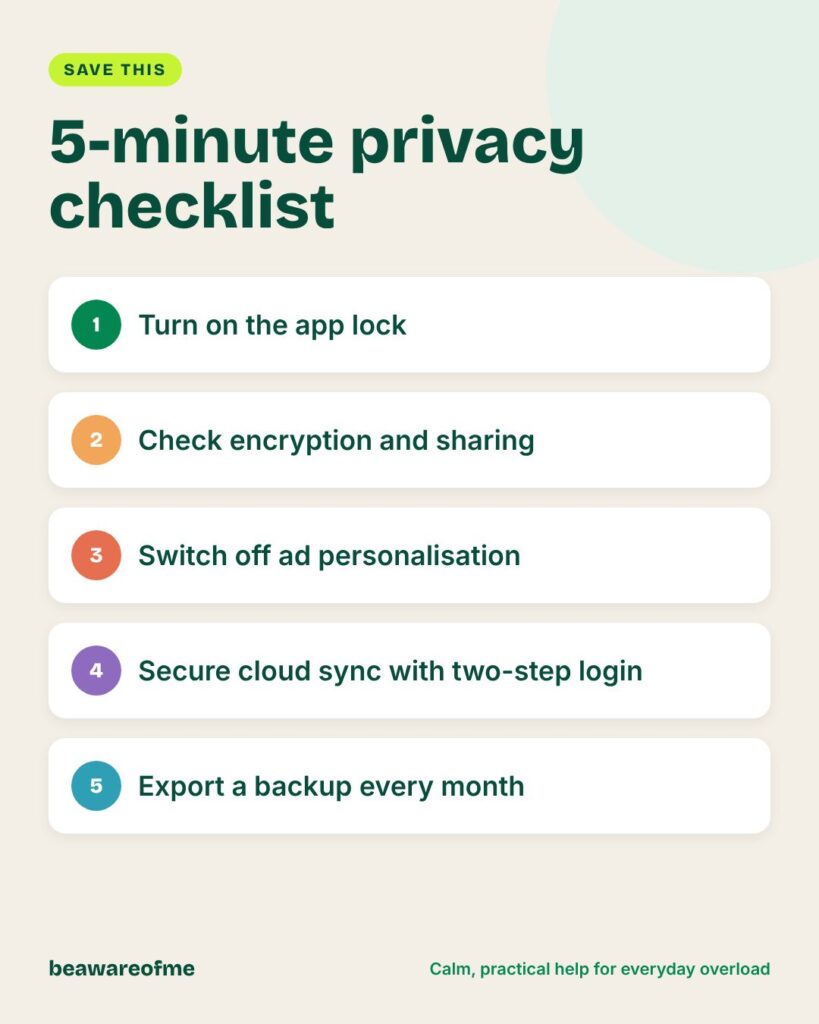
A 5-minute privacy checklist
- Turn on the app’s own lock, plus a strong passcode on your phone.
- Read the privacy section for three words: encryption, sharing and advertising.
- Turn off any option that shares your data for “personalisation” or ads.
- Check whether entries sync to the cloud, and secure that account with two-step login.
- Export a backup every month to a place only you can access.
- Hide previews so entries don’t show up in notifications or widgets.
Should you use AI journaling features?
Some apps now offer AI summaries, reflections or chat-style prompts. They can help you get started on a heavy day. Still, they usually mean your entries are processed on someone else’s servers.
Read exactly what the app does with your words before switching these features on. Keep the most personal details out if you’re unsure. For a wider look at how AI tools can affect how we feel, see our article on the emotional impact of AI companions.
If you share a device or live with others
Use a separate app with its own lock rather than a shared notes app. Avoid journaling in documents stored on family or work accounts. If you’re worried someone might read your journal to harm or control you, keep writing off shared devices entirely and consider talking to a support service.
A 5-Minute Digital Journaling Routine That Won’t Hook You Into Scrolling
A good digital journaling routine is short, starts and ends on purpose, and keeps the rest of your phone out of the way. Five minutes is plenty. The goal is to put something down, not to write an essay.
Set the stage in 30 seconds
Switch on focus or do-not-disturb mode. Open your journal app directly, not through your home screen full of badges. Put the app on your dock or first screen so it’s quicker to reach than social media.
- Type the date and one word for your mood.
- Answer: “What’s taking up the most space in my head?”
- Answer: “What’s one small thing I can do about it?”
- Add a tag, such as #work, #money or #sleep.
- Write one thing that went okay, then close the app.
If-then rules for real life
- If you only have one minute, then type your mood word and one sentence. That still counts.
- If you’re too tired to type, then record a one-minute voice note instead.
- If you open social media first, then move the journal app to where that app used to sit.
- If you miss a few days, then just write today’s entry. No catching up.
For a quick structured version, the free 5-minute self check-in walks you through a short reflection you can copy straight into your journal.
7 Easy Journal Formats for Busy, Stressed Days
One of the best parts of digital journaling is choice. On different days, different formats will feel easier. Try each of these at least once and keep the two or three that fit you.
1. The one-line diary
Write a single sentence every day. It’s digital journaling at its simplest. Over a year, those lines become a surprisingly moving record. It’s the lowest-effort habit there is.
2. The voice memo
Talk for one to three minutes while you walk or sit in the car (parked). Add a short written title so you can find it later.
3. Photo plus a line
Take one photo of something that caught your attention today, then write why. It trains you to notice small good moments.
4. Mood tags
Add a mood word and one or two tags to every entry. After a month, search a tag like #sunday to see how those days really feel.
5. The worry download
Type every worry as a fast list, then mark each one: act, wait or let go. If worry keeps you stuck at night, our guide to journaling for anxiety goes deeper.
6. Prompt of the day
Use a prompt list or app when the blank page feels heavy. Our collection of journaling prompts and techniques works well copied into a note.
7. Letters to future you
Write a note to yourself to read in three months. Many apps and email tools let you schedule it. For a more creative take, try the exercises in our guide to creative writing for a calmer mind.
A Weekly Digital Journaling Template You Can Copy Tonight
A simple template removes the blank-page problem and makes digital journaling feel automatic. Copy the one below into a pinned note or your app’s template feature. Each day gets one short prompt, so you never have to decide what to write.
| Day | Prompt | Takes |
|---|---|---|
| Monday | What’s one thing I want to protect this week? | 2 min |
| Tuesday | What drained me yesterday, and what helped? | 3 min |
| Wednesday | What am I worrying about that I can’t control? | 3 min |
| Thursday | Who or what made today a little easier? | 2 min |
| Friday | What did I get done that I’m not giving myself credit for? | 3 min |
| Saturday | Voice note: how does my body feel right now? | 2 min |
| Sunday | What’s one small thing I’ll do differently next week? | 5 min |
How to set it up in two minutes
Most notes apps let you duplicate a note. Make one master note with all seven prompts, then copy it each Monday and add the dates. If your app supports templates, save it there instead.
Keep the prompts visible at the top of each entry. That way, opening your digital journaling note shows you exactly what today asks. If a prompt doesn’t fit, answer “What’s on my mind right now?” instead.
Spot Your Patterns With a 15-Minute Monthly Review
The quiet superpower of digital journaling is search, and a monthly review is where it pays off. Once a month, set aside fifteen minutes to look back. You’re not grading yourself. You’re looking for clues.
Four searches worth running
- Search your most common mood word, such as “tired” or “anxious”, and note which days it appears.
- Search a tag like #work or #money and read the last four entries in a row.
- Search “went okay” or your gratitude tag to see the small good moments you logged.
- Search a person’s name to notice who tends to leave you lighter or heavier.
Turn what you find into one small change
Pick one pattern and one tiny adjustment. If Sunday entries keep mentioning dread, plan something gentle for Sunday evening. If #sleep keeps showing up, move your phone out of the bedroom for a week and see what digital journaling records next month.
Patterns around work stress are common. If that’s what you notice, our guide to using technology mindfully at work offers practical next steps.
Screens at Night: Journal Digitally Without Wrecking Your Sleep
Digital journaling and bedtime don’t mix well, mostly because phones are designed to keep you engaged. One notification can turn a two-minute reflection into forty minutes of scrolling. The fix is timing, not giving up.
Move your entry earlier
Journal after dinner or on your commute home rather than in bed. You’ll still close the day on paper, so to speak, without carrying the phone under the covers.
If you’d like firmer limits, our guide to setting a digital curfew explains how phone bedtimes can protect your rest. You might also find our ideas on balancing digital overload useful if screens feel constant.
Keep paper by the bed for 2am thoughts
A small notebook on the nightstand catches middle-of-the-night worries without lighting up a screen. Write one line, close it and roll over. Transfer anything important to your app in the morning.
The best journal isn’t the smartest app. It’s the one that helps you put the day down and leave it there.
5 Phone Journal Mistakes That Undo the Benefits
Most problems with digital journaling come from habits, not the technology. Here are the traps that catch people most often, and what to do instead.
Spending a week choosing the perfect app
Comparing features feels productive, but it delays the actual writing and drains your motivation. Instead, start today in your locked notes app and decide on a dedicated tool only after a month of real use.
Chasing streaks
Streak counters turn a calm habit into a test you can fail. One missed day can make you quit altogether. Instead, switch off streaks and badges, and measure success by how you feel after writing.
Writing with notifications on
Each ping pulls you out of reflection and into reaction. You end up with half-finished thoughts and a racing mind. Instead, turn on focus mode for the five minutes you write.
Skipping the backup
A lost phone or a shut-down app can wipe months of entries in a moment. Instead, export your journal monthly or turn on encrypted backup, so your words stay safe and portable.
Only ever venting
Typing fast makes it easy to rant without reflecting, which can leave you more wound up. Instead, end each entry with one small next step or one thing that went okay.
Your Questions About Journaling on a Phone, Answered
Is digital journaling as good as writing by hand?
Are journaling apps safe for private thoughts?
What is the best free way to start journaling on a device?
Can I use voice notes as a journal?
Should I journal on my phone before bed?
Is it okay to use AI prompts in a journal?
Your phone can either scatter your attention or help you gather it. Set up a locked, calm space, keep sessions short, and let digital journaling become the quiet five minutes where your day finally makes sense. For more ways to keep technology working for your wellbeing, read our guide to a gentle digital detox or browse the mental health in life section.