

By mid-afternoon your neck aches, your eyes burn and every small request feels like too much. You might blame the workload, and sometimes that’s fair. But a lot of that frayed, short-fused feeling starts with a chair, a screen and a desk that fight your body all day. This guide explains the role of ergonomics in both physical and mental workplace stress, then gives you a 15-minute audit, a fix list and scripts for asking your employer for better equipment.
⭐ Key takeaways
Set your screen about an arm’s length away with the top at or slightly below eye level.
Keep your feet flat, your wrists straight and your elbows close to your body while you type.
Change position at least every 30 to 60 minutes, because no posture stays comfortable all day.
Treat afternoon irritability as a possible body signal, not only a mood or workload problem.
Reduce mental friction too: fewer alerts, tidier tools and clear break times count as ergonomics.
Ask for equipment with a short, specific request that links comfort to better work.
The Role of Ergonomics, Explained in One Minute
The role of ergonomics is to design work around people instead of forcing people to fit the work. The US Occupational Safety and Health Administration describes it simply as fitting a job to a person. That sounds technical, yet it really covers everyday things like how you sit, what you look at and how your day flows.

Here’s the whole guide at a glance. Find the row that matches your most annoying daily niggle and start there.
The role of ergonomics at a glance
| What you notice | Likely setup cause | First fix |
|---|---|---|
| Stiff neck by lunch | Screen too low, often a laptop | Raise the screen to eye level |
| Burning, tired eyes | Screen too close, too few breaks | Move it back, look away often |
| Tense shoulders | Desk or keyboard too high | Lower the keyboard or raise the chair |
| Aching lower back | No back support, feet dangling | Add a cushion and a footrest |
| Afternoon irritability | Hours of strain plus no movement | Stand and move every 30 to 60 minutes |
| Scattered, foggy focus | Constant alerts and messy tools | Batch notifications, tidy your screen |
The three kinds of ergonomics most guides skip
Most people think the role of ergonomics begins and ends with a fancy chair. In practice, the field looks at three layers. Physical ergonomics covers your body: posture, reach and repetitive movements. Cognitive ergonomics covers your mind: how much information, switching and decision-making your tools demand.
Organisational ergonomics covers the structure of the day: breaks, schedules and workload. Understanding the role of ergonomics across all three layers is what makes it a genuine stress tool. A perfect chair can’t fix a day with no breaks, and good breaks can’t fully fix a screen that strains your neck.
15 → 5-7
Blinks per minute drop from about 15 to 5-7 while using screens.
American Academy of Ophthalmology
20-40 in
Recommended screen distance from your face, about 50 to 100 cm.
Mayo Clinic
1 idea
Ergonomics means fitting the job to the person, not the reverse.
OSHA
How Physical Strain Turns Into Mental Stress
Physical discomfort and mental stress feed each other, which is why the role of ergonomics reaches well beyond sore muscles. A body that aches or strains keeps sending small alarm signals, and that’s where the role of ergonomics in mental stress begins. Over a long day, those signals use up attention and patience you’d rather spend on work and people.
The discomfort loop
It often goes like this. A low screen pulls your head forward, your neck tightens, and you start to feel tense without noticing why. Tension makes you brace, bracing makes you shallow-breathe, and shallow breathing feeds the sense that something is wrong. By 3 p.m., a simple email feels irritating.
Pain and stress can also lock into a cycle, where each one makes the other worse. Our guide on breaking the chronic pain and stress cycle explains this loop in more depth.
Why eye strain feels like stress
Screen work quietly changes how you use your eyes. The American Academy of Ophthalmology notes that people blink about 15 times a minute normally, but only about 5 to 7 times a minute at a screen. Dry, tired eyes can bring headaches and that wired-but-tired feeling, which many people read as stress.
📝 Note
Discomfort doesn’t have to be dramatic to matter. A mild ache you barely notice can still drain energy across eight hours. The role of ergonomics is to catch those quiet costs before they add up.
Five signs your setup is feeding your stress
It’s easy to blame every bad afternoon on workload. These patterns suggest the role of ergonomics deserves a closer look in your day:
- Your neck or shoulders feel fine in the morning and tight by mid-afternoon.
- Headaches or eye strain show up on long screen days and fade on days off.
- You feel calmer working from a different desk, café or room.
- You catch yourself leaning toward the screen or perching on the edge of your chair.
- Irritability peaks after long stretches without standing up.
If two or more sound familiar, your setup is likely adding to the load. That’s good news, because a setup is far easier to change than a job.
Control matters to your nervous system
Being able to adjust your chair, light or screen gives you a sense of control over your environment. Feeling stuck in a setup that hurts, with no way to change it, adds a layer of helplessness on top of the discomfort. Even small adjustments can restore that feeling of having a say.
The 15-Minute Desk Audit That Shows the Role of Ergonomics
A quick audit turns vague discomfort into a clear fix list. You don’t need special tools, only a phone camera and a few honest minutes. Sit as you normally do, then work through these checks from the floor up.
Your 15-minute ergonomic audit
Feet
Flat on the floor or a footrest, with thighs roughly parallel to the floor.
Back
Supported by the chair, ideally with a curve or cushion at your lower back.
Arms
Elbows close to your body, shoulders relaxed, wrists straight while typing.
Screen
Directly in front of you, about an arm’s length away, top at or slightly below eye level.
Reach
Mouse beside the keyboard, phone and water within easy reach without stretching.
Light
No bright window or lamp glaring on the screen or straight into your eyes.
Use a photo, not your feelings
Ask someone to take a side-on photo while you work, or prop your phone on a shelf and set a timer. Most of us think we sit upright, and the photo shows the truth. Look for a forward head, raised shoulders and bent wrists.
The measurements that actually matter
Mayo Clinic’s office ergonomics guide recommends keeping your screen no closer than about 20 inches (50 cm) and no farther than about 40 inches (100 cm). The top of the screen should sit at or slightly below eye level. If you wear bifocals, lower the screen another 1 to 2 inches.
💡 Tip
Laptop users have the hardest time, because screen and keyboard come joined. A cheap stand plus an external keyboard and mouse fixes most laptop strain in one step.
Seven Low-Cost Fixes for Your Body
Most ergonomic improvements cost little or nothing, which makes the role of ergonomics easy to test for yourself. You can make several of these today with items already in your home or office. Start with the fix that matches your worst symptom.
Fixes you can make in five minutes
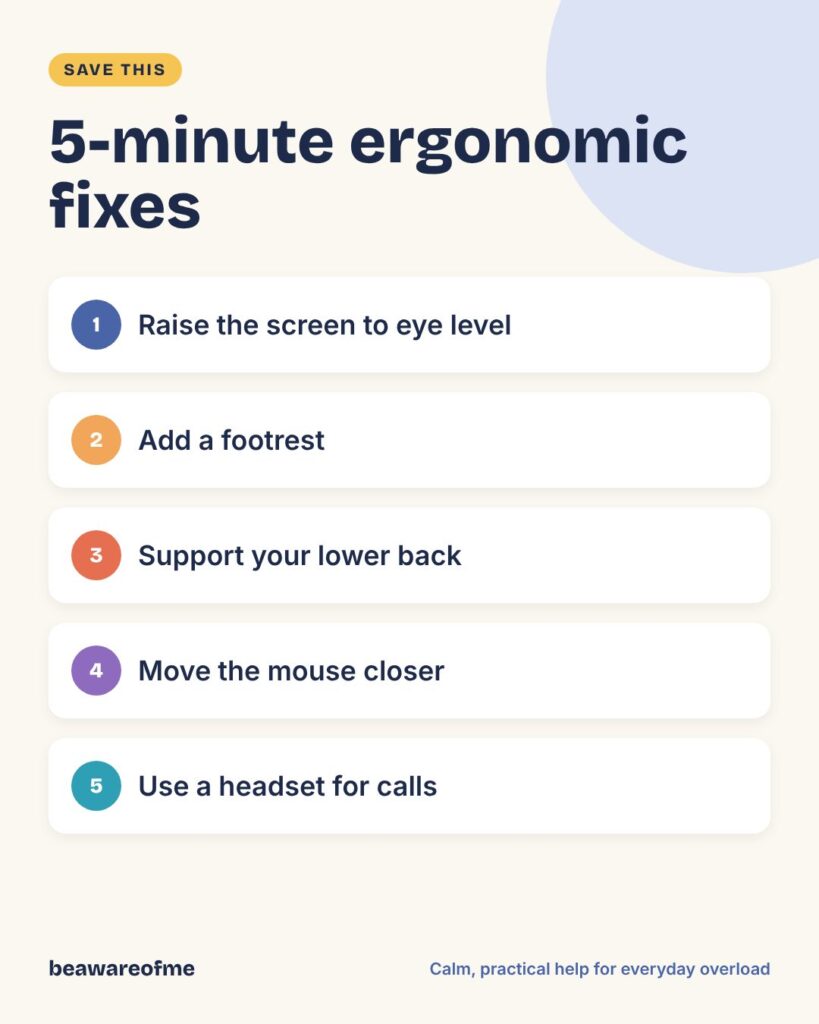
- Raise the screen on a stack of sturdy books or a box until the top is at eye level.
- Add a footrest with a small stool, a box or a firm cushion if your feet dangle.
- Support your lower back with a rolled towel or small cushion.
- Move the mouse closer so your arm stays near your body.
- Use a headset instead of cradling a phone between your ear and shoulder.
Fixes worth a small budget
- A laptop stand with a separate keyboard and mouse.
- An adjustable chair with lower-back support and armrests you can lower.
- A desk lamp you can point away from the screen to cut glare.
Working from home adds its own challenges, like kitchen tables and sofas. Our guide on creating a stress-free workstation at home covers that setup step by step, so this article can stay focused on the stress link itself.
✨ Quick win
Set your screen height first. For many desk workers, it’s the single change that relieves neck and shoulder tension fastest.
Movement Is the Missing Half of the Role of Ergonomics
Even a perfect posture becomes a problem if you hold it for hours. Your body likes variety, so movement is the other half of the role of ergonomics. Mayo Clinic suggests changing positions often and standing or walking when you can.
A simple movement rhythm
Aim to shift position at least every 30 to 60 minutes. That can mean standing for a call, walking to refill water or stretching your hands and arms at your desk. The long-term risks of sitting still are real, and our guide on the dangers of sitting too much explains them.
An hourly reset in under two minutes
Stand up
Rise slowly and shake out your hands.
Roll your shoulders
Five slow circles back, five forward.
Look far away
Rest your eyes on the farthest point you can see and blink fully a few times.
Breathe out slowly
Two long exhales to release any bracing.
Sit back down tall
Reset your feet, back and elbows before you start again.
Make breaks easy to remember
Tie movement to things you already do. Stand for every phone call, walk while you think through a problem, or stretch while files load. Our ideas for quick desk exercises and microbreaks during the workday give you plenty of options.
⚠️ Watch out
Standing desks help, but standing all day isn’t the answer either. Alternate between sitting and standing, and change positions before discomfort starts, not after.
Mental Ergonomics: Cutting Friction for Your Brain
Cognitive ergonomics means shaping your tools and information so your brain works with less strain. Constant alerts, cluttered screens and endless switching tire the mind much like a bad chair tires the back. The role of ergonomics here is to make focus the easy default.
Calm your screen
- Turn off non-essential notifications and check messages at set times.
- Close tabs you’re not using, and keep one main window in front of you.
- Use larger text or zoom if you find yourself leaning toward the screen.
- Keep a single list of tasks instead of notes scattered across apps.
Calm your surroundings
Noise, harsh lighting and clutter all add mental load. Headphones, a desk lamp and a clear surface each reduce it a little. If you work in an open office, these mindfulness practices for a noisy office help you protect focus, and our guide to mindful technology at work covers digital habits.
Organisational ergonomics: shape the day, not just the desk
The third layer covers how work is arranged across the day. Long blocks without breaks, constant meetings and unclear priorities strain people even at a perfect desk. This is where the role of ergonomics overlaps with good management.
- Block focus time in your calendar and protect it like a meeting.
- Put a short movement break between long calls.
- Group similar tasks, such as all emails or all admin, to reduce switching.
- Agree with your team on when messages need an instant reply and when they can wait.
If you lead a team, these small structural choices often matter as much as any equipment budget. They also show people that comfort and focus are taken seriously.
A good setup doesn’t make work easy. It stops the setup from being one more thing to cope with.
beawareofme
How to Ask Your Employer for Ergonomic Support
Many employers understand the role of ergonomics and would rather provide a chair or stand than lose productive time to discomfort. Asking clearly and early is part of the role of ergonomics at work. These scripts help you make the request without feeling awkward.
Script for a simple equipment request
✉️ Copy-ready request
☐“Hi [name], I’ve noticed neck and shoulder strain from my current setup.”
☐“A laptop stand and separate keyboard would help me work more comfortably and focus longer.”
☐“Could we look at getting these, or is there an ergonomic assessment I can book?”
☐“Happy to send links or options if that helps.”
When discomfort links to a health condition
If pain, a disability or a mental health condition affects how you work, you may be entitled to reasonable adjustments, depending on where you live. Our guide on workplace accommodations for depression and anxiety explains how these requests work and what to ask for.
📝 Note
Persistent pain, numbness or tingling in your hands, arms or back deserves a check with a doctor or physiotherapist. Ergonomic changes help, but they don’t replace a proper assessment.
A 7-Day Plan to Put the Role of Ergonomics to Work
Changing everything at once rarely sticks, so spread the fixes across a week. Each day takes ten minutes or less. By day seven, the role of ergonomics stops being an idea and becomes the way your workspace simply works.
Your one-week ergonomic plan
| Day | Focus | Ten-minute action |
|---|---|---|
| Day 1 | Audit | Take a side-on photo and run the 15-minute desk audit |
| Day 2 | Screen | Set screen height and distance, then reduce glare |
| Day 3 | Chair and feet | Adjust chair height, add a footrest and lower-back support |
| Day 4 | Arms and reach | Bring the keyboard and mouse close, straighten your wrists |
| Day 5 | Movement | Set a 45-minute reminder to stand, stretch and look far away |
| Day 6 | Mental load | Turn off non-essential alerts and close unused tabs |
| Day 7 | Review | Note what feels better and what still aches, then adjust |
Track how you feel, not just what you changed
At the end of each day, rate your neck, eyes and mood from 1 to 5. A simple note on your phone is enough. After a week, you’ll see which changes made the biggest difference, which keeps you motivated to maintain them. If your energy still feels low, the free battery check can help you spot other drains.
💡 Tip
Recheck your setup whenever something changes: a new desk, a new laptop, a second monitor or a move to home working. Small shifts in equipment often undo good habits without you noticing.
Common Mistakes That Undo the Role of Ergonomics
Good intentions sometimes make ergonomics worse, and they can hide the real role of ergonomics in your stress. These five mistakes are easy to miss, so check whether any apply to you.
Buying gear before checking the basics
An expensive chair won’t help if your screen still sits too low. Many problems come from layout, not equipment. Instead, run the 15-minute audit first and buy only what fixes a clear gap.
Sitting perfectly still in the “right” posture
People often hear about ideal posture and then lock into it. Holding any position for hours creates strain. Instead, treat good posture as a home base you return to between frequent changes.
Ignoring your eyes
Most ergonomic advice focuses on backs and wrists. Yet screen distance, glare and blinking shape how tired you feel. Instead, check screen distance and light, and give your eyes regular breaks to focus far away.
Fixing the body but not the day
A beautiful desk can’t make up for a schedule with no breaks or a nonstop stream of alerts. Instead, pair physical changes with cognitive and organisational ones, like batched messages and planned movement breaks.
Waiting until it hurts
Many people only adjust their setup after pain shows up. By then, the strain has often built up for weeks. Instead, make small adjustments as soon as you notice tension, and recheck your setup whenever you change desks or devices.
📚 Keep reading
Questions People Ask About Ergonomics and Stress
How does ergonomics reduce stress at work?
Ergonomics reduces stress by removing constant physical strain and mental friction. A screen at the right height, a supportive chair and tools within easy reach mean fewer aches and less tension. Fewer alerts and regular movement breaks lower mental load. Together, these changes leave more energy and patience for your actual work and the people around you.
Can a bad desk setup affect your mental health?
A poor setup can contribute to feeling tense, tired and irritable, especially over long days. Ongoing neck pain, eye strain and headaches use up energy and make stress harder to manage. A bad desk alone is unlikely to be the only cause of mental health problems, but improving it removes one avoidable source of daily strain.
What is the correct monitor height and distance?
Mayo Clinic suggests placing the monitor directly in front of you, about an arm’s length away, no closer than about 20 inches and no farther than about 40 inches. The top of the screen should sit at or slightly below eye level. If you wear bifocals, lower the screen an extra one to two inches.
How often should I take breaks from sitting at a desk?
Change position at least every 30 to 60 minutes. A break can be short: stand for a call, walk to refill water or do a few shoulder rolls and stretches. Regular eye breaks also help, so look at something far away and blink fully. Small, frequent breaks usually work better than one long break.
What is cognitive ergonomics?
Cognitive ergonomics looks at how work affects your thinking: attention, memory, decision-making and mental load. It covers things like notifications, cluttered screens, confusing software and constant task switching. Simple fixes include batching messages, closing unused tabs and keeping one task list. Reducing this friction helps your brain feel less tired by the end of the day.
Is my employer responsible for providing ergonomic equipment?
It depends on where you live and your employer’s policies. Many employers offer workstation assessments or equipment, and some countries require employers to manage workstation risks. If a health condition affects your work, you may be able to request reasonable adjustments. Start with a clear, polite request to your manager or HR team.
Your workspace sends signals to your body every minute of the day. When those signals say “strain”, stress builds; when they say “supported”, you have more left to give. Start with your screen, add movement, trim the mental clutter, and let the role of ergonomics work quietly in your favour.
🛟 Please read
Educational content, not a substitute for professional care. If you are struggling, talk to a doctor or a qualified professional. If you are thinking about harming yourself, contact local emergency services or a crisis line now (US 988, UK and Ireland Samaritans 116 123, or findahelpline.com).