








You say “time to turn it off,” and the room explodes: tears, bargaining, slammed doors, and a parent who feels like the bad guy again. If that’s your evening most days, you’re not failing. Screen time battles are one of the most common flashpoints in family life, and they usually come from the way screens end, not from your rules. This guide shows you how to stop the daily fight with transition tricks, scripts by age and a family plan your kids help write.
🧭 Key takeaways
Most screen time battles happen at the moment a screen ends, so plan the ending, not just the limit.
Set rules together during a calm moment, not while a device is in your child’s hands.
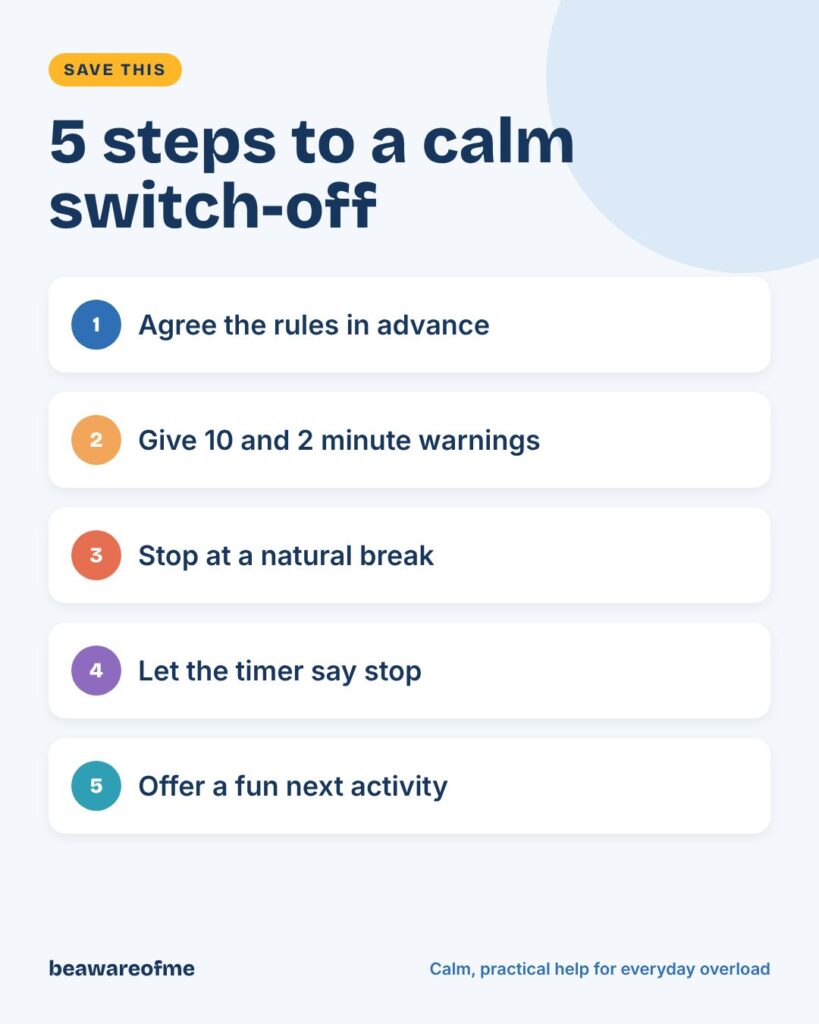
Use a visual timer and a 10-minute and 2-minute warning to make transitions predictable.
Stop at a natural break, like the end of an episode or game level, to cut meltdowns.
Keep screens out of bedrooms at night and off for about an hour before bed.
Follow the same rules yourself, because kids copy what you do far more than what you say.
Why Screen Time Battles Start (Hint: It’s Not Your Child’s Character)
Screen time battles start mainly because screens are designed to hold attention and stopping them feels like a sudden loss. Apps, shows and games keep going with autoplay, streaks and next levels. When you pull the plug, your child’s brain goes from very interesting to nothing in one second.

Here’s this guide on one screen. Find the moment where the fight usually starts in your home and begin there.
Ending screen time battles at a glance
| Flashpoint | Why it blows up | Calm fix |
|---|---|---|
| The “turn it off” moment | Sudden stop mid-game or mid-show | Warnings plus stopping at a natural break |
| “Just five more minutes” | Rules feel open to debate | Agree limits in advance and use a timer |
| Screens at bedtime | Devices fight sleep | Screens off an hour before bed, charge outside bedrooms |
| Mealtimes | Phones pull attention from people | Screen-free table for everyone, adults too |
| Boredom after screens | Nothing feels as exciting | Offer a clear next activity before switching off |
| Teen phone use | Rules feel controlling | Co-create the plan and revisit it together |
The brain science in plain words
Screens offer quick rewards: a new video, a level-up, a like. That fast stream of novelty is hard for any brain to walk away from, and children’s self-control skills are still developing. It’s not that your child is spoiled. They’re facing a design built to keep them watching.
Why the fight feels so personal
When you’re the one switching it off, your child sees you as the obstacle. That’s why screen time battles can feel like a power struggle. The more you can hand that job to timers, routines and agreed rules, the less it becomes about you versus them.
1 hour
Maximum daily sedentary screen time for ages 2-4, and less is better
WHO
0
Sedentary screen time recommended for babies under 1
WHO
1 hour
Stop screens about an hour before bedtime
Seattle Children’s
📝 Note
Screen time isn’t all bad. Video calls with grandparents, creative apps and shows you watch together can all be positive. The goal is balance and calm, not a screen-free life.
Set the Rules Before the Device Is On
The best time to end screen time battles is before they begin, by agreeing the rules when everyone is calm and no screen is on. Negotiating with a child who is mid-game rarely ends well. Planning together at the kitchen table usually does.
Hold a short family meeting
Pick a relaxed time, like a weekend breakfast. Ask your kids what they love about screens and what they think good limits might look like. You’ll be surprised how often children suggest fair rules when they feel heard.
Use a family media plan
The American Academy of Pediatrics offers a free Family Media Plan tool on HealthyChildren.org that helps you build a personalised plan for how media is used in your home. You choose priorities such as screen-free zones, times and content rules, then print or share it.
According to Seattle Children’s screen time guidance, the AAP has moved away from strict limits by age group for older children, encouraging families to build a plan around their own values and routines instead. That’s good news: one plan, built together, beats a rule you made up in frustration.
Write it down and post it
A written plan stops arguments about what was agreed. Keep it short, positive and visible on the fridge. “Screens off at 7 pm” is clearer than “not too much screen time.”
Plan for weekends, holidays and sick days
Many screen time battles flare up on days that break the routine. Decide ahead whether weekends get a little more time, what happens on long car trips and how sick days work. When the exceptions are written down too, kids stop treating every special day as a fresh negotiation.
Build your family screen plan in five steps
Ask
Find out what each child enjoys most about screens and why.
Decide
Agree when, where and how long screens are used on school days and weekends.
Protect
Name screen-free times and places, like meals, the car on short trips and bedrooms at night.
Write
Put the plan on one page, in simple words, and let kids decorate it.
Review
Revisit it every month or two, and adjust as your kids grow.
Master the Ending: Transitions That Stop the Meltdown
Most screen time battles erupt at the transition, so a smoother ending is the single biggest fix you can make. Kids need time to wrap up and a clear idea of what comes next. Give them both, and the drama drops.
Warnings that actually work
Give a 10-minute warning and then a 2-minute warning. Say it close up, with eye contact, not shouted from another room. Ask them to repeat it back: “How many minutes are left?”
Stop at a natural break
Ending mid-level or mid-episode feels like a cliffhanger. Instead, agree on stopping points: “after this episode” or “when you finish this level.” For games without clear breaks, set the timer before they start.
Let the timer be the bad guy
A kitchen timer, a visual timer or a built-in device timer turns “Mum says stop” into “the timer says stop.” This simple shift takes the personal sting out of screen time battles. Little kids especially like seeing the time shrink.
✨ Quick win
Offer a fun “landing activity” right after screens end, like a snack, a walk with the dog or helping cook dinner. A clear next step softens the drop from exciting to ordinary.
Give a heads-up before screens even start
Transitions get easier when kids know the deal before they press play. Say how long they have and what comes after: “You can watch two episodes, then it’s bath time.” That small preview means the ending is no surprise, so there’s less to fight about when it arrives.
Turn off autoplay
Autoplay is designed to roll straight into the next episode. Switch it off in your streaming and video apps. That way, the end of a show is a real ending, not a doorway to another one.
Switch-Off Scripts by Age That Keep Evenings Calm
The words you use at the moment screens end can calm things down or light the fuse, so it helps to have scripts ready for your child’s age. Keep your tone warm but firm. You can acknowledge feelings and still hold the line.
Toddlers and preschoolers (2-5)
Keep words short and use routines: “Two more minutes, then bye-bye tablet.” When time is up, say “Bye-bye show!” and move straight to the next activity. Expect some tears, and stay calm and kind. The WHO guidelines suggest no more than one hour of sedentary screen time a day for ages 2-4, and less is better.
School-age kids (6-9)
Name the feeling, then the plan: “I know it’s hard to stop when you’re having fun. Timer’s done, so it’s time to switch off. Want to show me what you built after dinner?” Praise them when they switch off without a fight.
Tweens (10-12)
Tweens respond to fairness. Try: “We agreed on one hour after homework. That hour is up. Do you want to stop now or finish this round first, then stop?” Offering a small choice within the rule gives them some control.
Teens (13+)
With teens, connection beats control. Ask, “How do you feel after a long scroll?” and share your own struggles too. Agree on a few non-negotiables, like phones out of bedrooms at night, and leave room for them to manage the rest.
🧭 Try this today: the calm switch-off script
☐Before screens: “You’ve got 30 minutes. When the timer goes, it’s time to stop.”
☐10-minute warning: “Ten minutes left. Find a good stopping point.”
☐2-minute warning: “Two minutes. Finish your level or episode.”
☐At the end: “Timer’s done. I know it’s hard to stop. Let’s go make a snack.”
☐If they push back: “I hear you. The rule stays the same. You can try again tomorrow.”
Consequences That Teach Instead of Fuel the Fight
When rules are broken, calm and related consequences work better than big threats, because they teach without turning screen time battles into all-out wars. Shouting “No screens for a month!” usually backfires. Short, fair and predictable consequences hold up better.
Keep consequences small and linked
If a child refuses to switch off, a fair consequence might be less screen time tomorrow, not a month-long ban. Link it clearly: “Because it was hard to stop today, screen time tomorrow will be shorter.” Then follow through calmly.
Avoid using screens as the main reward or punishment
Seattle Children’s advises against using screens as a reward or as a way to calm children down. When screens become the top prize, they gain even more power. Try praise, time together or a privilege like choosing dinner instead.
⚠️ Watch out
Big, emotional threats in the heat of the moment are hard to enforce. If you can’t follow through, kids learn the rules aren’t real. Only promise consequences you’ll actually keep.
Reconnect after the conflict
After a blow-up, come back together once everyone is calm. A hug, a short chat or a shared activity rebuilds trust. Our article on discussing behavioural problems with your child has a gentle framework for that talk.
Make Screens Less Tempting by Changing the Setup
Changing your home’s setup quietly reduces screen time battles, because fewer devices in reach means fewer fights to have. You don’t need willpower when the environment does the work. Small tweaks go a long way.
Create screen-free zones
Keep meals and bedrooms screen-free, especially at night. Seattle Children’s recommends keeping devices out of bedrooms overnight and using an alarm clock instead of a phone. Our guide to creating screen-free zones walks through which spaces matter most.
Charge devices in one family spot
Set up a charging station in the kitchen or hallway. All phones and tablets, adults’ too, go there at a set time each evening. This also supports better sleep, which our article on digital curfews explains in detail.
Make the alternatives easy
Keep books, puzzles, art supplies, balls and board games in easy reach. When boredom hits, the easiest option often wins. If a deck of cards is right there, it has a fighting chance against the tablet.
When siblings share one device
Shared tablets and consoles are a classic source of screen time battles between kids, not just with parents. Set a simple turn schedule, use a timer for each turn and let the child waiting choose the next family activity. Fair, visible turns cut the “it’s my go” arguments sharply.
💡 Tip
Use built-in parental controls to set daily limits and bedtime shutdowns. They do the reminding for you. Just remember filters aren’t foolproof, so keep talking with your kids about what they see online.
Model the Habits You Want to See
Kids learn screen habits mostly by watching you, so your own phone use is part of ending screen time battles. If you scroll at dinner, a “no phones at the table” rule feels unfair. When you put your phone away, it sends a powerful message.
Notice your own patterns
Fewer screen time battles often begin with an honest look in the mirror. Try a quick check: how often do you pick up your phone when your kids are talking to you? Many parents are surprised. Our article on how much screen time is too much includes tips for adults too.
Say it out loud
Narrate your own choices: “I’m putting my phone away so we can play.” Or, “I’ve been on my phone too long; I’m going outside for a bit.” Your kids see that everyone, not just them, works on balance.
Kids follow the habits they see far more than the rules they hear.
beawareofme
Watch and play together
Shared screen time can be warm and connecting. Watch a show together, play a game as a team or ask your child to teach you their favourite app. It’s harder to battle over something you share.
When Screen Time Battles Point to Something Deeper
Sometimes constant screen time battles are a sign that something else is going on, like stress, loneliness or anxiety, and screens have become a way to cope. Look at the whole picture, not just the minutes. Curiosity helps more than control here.
Signs worth a closer look
- Your child seems unable to stop even when they want to.
- Screen use is crowding out sleep, schoolwork, friends or activities they used to enjoy.
- Big mood changes, like anger or sadness, happen whenever screens are limited.
- They use screens to escape worries they won’t talk about.
If you notice these patterns, talk with your child gently and consider speaking to their doctor. Our guides on technology and childhood anxiety and teen social media addiction symptoms can help you spot what’s happening.
📝 Note
Stress often drives the urge to escape into screens. Teaching kids calming skills can help, and our guide to teaching kids stress relief techniques has age-by-age ideas.
5 Common Mistakes That Make Screen Time Battles Worse
These are easy traps for loving, busy parents. Each one has a simple swap that cools things down.
Mistake 1: Making rules in the heat of the moment
Rules invented mid-argument feel unfair and change often. Instead, agree the rules calmly in advance, write them down and stick to them. Consistency is what makes limits feel real.
Mistake 2: Pulling the plug without warning
Sudden shutdowns feel like losing something precious. Give a 10-minute and 2-minute warning, and stop at a natural break. Predictable endings lead to far fewer meltdowns.
Mistake 3: Banning everything at once
Going from hours a day to zero often triggers rebellion. Reduce gradually and replace screen time with appealing options. Small changes stick better than a dramatic overhaul.
Mistake 4: Ignoring your own screen habits
Kids notice double standards right away. If you want screen-free meals, put your own phone away too. Shared rules feel fairer and cause fewer arguments.
Mistake 5: Treating all screen time the same
A video call with a grandparent isn’t the same as endless scrolling. Talk about the quality of content, not just the clock. Focus your limits on the types of use that cause the most trouble.
📚 Keep reading
Questions Parents Ask About Screen Time Battles
How do I stop screen time battles with my child?
Agree the rules in advance, ideally in a written family plan your child helps create. Give a 10-minute and 2-minute warning, stop at natural breaks like the end of an episode, and use a timer so the clock decides. Offer a clear next activity, stay calm when they push back, and follow the same rules yourself.
How much screen time is okay for kids?
The WHO suggests no sedentary screen time for babies under one and no more than one hour a day for ages two to four, with less being better. For older children, many experts now focus on a family plan rather than a strict number. Protect sleep, meals, schoolwork, play and time together first, then fit screens around them.
Why does my child get so angry when screen time ends?
Screens deliver fast, exciting rewards, and stopping suddenly feels like a loss. Children’s self-control is still developing, so switching from a game to ordinary life is hard. Warnings, natural stopping points, timers and a fun next activity make the transition easier. Anger at switch-off is common and usually eases once the routine becomes predictable.
Should I take away screens as a punishment?
Using screens as the main reward or punishment can make them seem even more valuable. Small, related consequences usually work better, such as shorter screen time tomorrow after a hard switch-off. Explain the link calmly and follow through. Avoid huge threats you can’t keep, since they teach kids the rules aren’t real.
How do I handle screen time with teenagers?
With teens, collaboration works better than strict control. Ask how screens make them feel, share your own habits honestly, and agree a few firm rules, like phones out of bedrooms at night. Leave room for them to manage the rest. Revisit the plan regularly as they grow and show they can handle more responsibility.
Do parental controls help reduce arguments?
Parental controls can help by setting daily limits and bedtime shutdowns automatically, so you aren’t the one switching devices off. They also filter some content. However, no filter is foolproof, so keep talking with your kids about what they see online. Controls work best alongside a clear family plan, not as a replacement for it.
Calmer evenings are possible, and they usually start with a better ending, not a stricter limit. Agree the plan together, give warnings, let the timer do the reminding and model the habits you want. Step by step, screen time battles can turn into simple, predictable routines your whole family can live with.
🛟 Please read
Educational content, not a substitute for professional care. If you are struggling, talk to a doctor or a qualified professional. If you are thinking about harming yourself, contact local emergency services or a crisis line now (US 988, UK and Ireland Samaritans 116 123, or findahelpline.com).